How to Transcribe Instagram Reels
A complete guide: the fast method, the manual fallback, how to tell a bad transcript from a good one, and what to do when a Reel refuses to transcribe at all.
On this page
The fast method: paste the link
You do not need to download the video, install anything, or create an account. The whole job is three steps.
- Get the Reel's link. In the Instagram app, open the Reel, tap the share icon, and choose Copy link. On desktop, click the three-dot menu on the post and choose Copy link. The link looks like
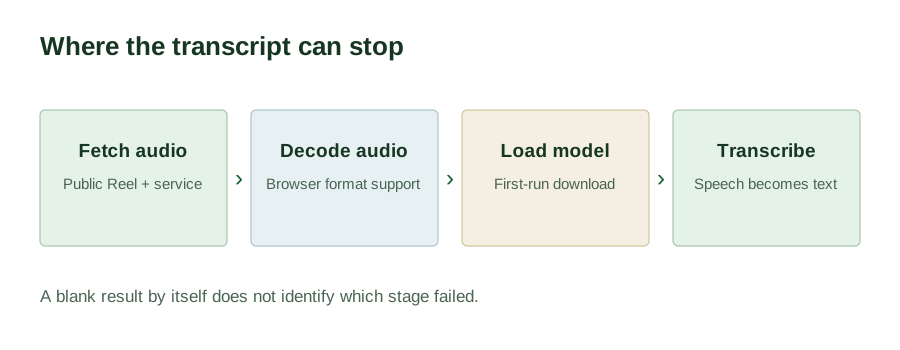
https://www.instagram.com/reel/XXXXXXXXX/. - Paste it and run it. Open the tool, paste the link into the field, and select Get transcript. The page will tell you what it is doing at each stage — fetching the audio, decoding it, then recognising speech.
- Take the result. When the status reads Done, use Copy or Download .txt.
The manual fallback
Sometimes a link cannot be fetched — the post is private, it was deleted, or it is restricted in the region the audio is retrieved from. If you have legitimate access to the video (it is your own, or it is public and you can play it), the manual route still works:
- Play the Reel with captions or subtitles enabled if they exist. Instagram's own auto-captions, when present, can be read and copied off the screen.
- If you need the spoken words rather than the caption text, play the Reel and type or dictate what you hear. It is slow, but it works on anything you can watch.
- Use the phone's built-in dictation while the Reel plays in another window, then correct the result. This is usually faster than typing and about as accurate as a small speech model.
The manual route has one advantage worth remembering: it works on private content you have legitimate access to, which no link-based tool can do.
Getting better accuracy
Speech recognition quality is mostly decided before the model ever runs. What actually moves the needle:
- Clean speech beats loud speech. A Reel recorded close to the microphone with little background noise transcribes far better than one recorded in a busy street.
- One speaker at a time. Overlapping voices — a two-person conversation, a reaction video, a duet — are where recognition degrades fastest. There is no speaker separation here, so overlapping speech produces merged, garbled text.
- Music is the enemy. Background music under speech makes the model work harder, and a music-only Reel has nothing to transcribe at all.
- Read for the specific error types. Small models fail in predictable places: proper nouns, brand names, product names, technical jargon, numbers, and strong accents. If your Reel is about a specific product or a niche field, expect to fix those terms by hand.
- Do not trust punctuation. The model inserts its own. It is usually reasonable and occasionally changes the meaning of a sentence. Read for that specifically.
If accuracy matters more than cost, a paid service running a larger model will beat any small on-device model. The comparison page is honest about where this tool loses.
When a Reel will not transcribe
Failure is normal and usually has a mundane cause. Check these in order:
- Is the post actually public? Private, followers-only, and age-restricted posts cannot be retrieved by any external tool. This is the single most common cause.
- Was the link copied correctly? The link must point at the post itself. A link to a profile, a story, or a saved collection is not a Reel link and will be rejected.
- Does the Reel still exist? Instagram links go stale. A link that worked last month may point at a deleted or renamed post today.
- Is there any speech in it? A Reel that is music, text-on-screen, or silent returns an empty transcript. That is the correct answer, not a failure.
- Is the audio region-restricted? A Reel available in your country may not be retrievable from wherever the audio is fetched.
- Is the video extremely long? There is no fixed length cap here, but very long audio can take a long time to process in a browser, and a tab that sleeps or runs out of memory mid-run will not finish.
If none of those apply and it still fails, the post is probably simply not retrievable right now. Try a different Reel to confirm the tool itself is working before assuming something is broken.
What to do with the text afterwards
The transcript is a starting point, not a finished asset. The usual next steps:
- Edit it into a caption or post. Spoken English and written English differ. Cut the filler, tighten the sentences, keep the substance.
- Quote it. If you are citing the creator, check the wording against the audio for any proper nouns before you publish.
- Translate it. Translation tools need text. Paste the transcript in and edit the output, which will be better than translating from a video you cannot paste.
- File it. Save it as a
.txtwith the Reel URL in the filename. Nothing is stored on this site between visits, so if you want to keep it, keep it yourself.
Using someone else's words
Transcribing a public Reel is straightforward. What you do with the resulting text is a separate question, and it is worth thinking about before you publish:
- Reading, researching, and note-taking with a transcript is unremarkable.
- Quoting someone with attribution is normal practice, and a transcript is exactly what makes the quote accurate.
- Republishing the whole thing as your own is not. A transcript is not a licence. The words still belong to whoever said them.
A transcript tells you what was said. It does not tell you what you are allowed to do with it.
Transcribe an Instagram Reel →Start with the specific Reel you want to process. The direct tool lets you turn an Instagram Reel into text from one public link without uploading the video. Save and check that draft before moving to the next Reel.