Instagram Reel Transcript Not Working? Find the Failed Step
If a Reel link produces no transcript, first check the status message. A failure while fetching audio is different from a failure while decoding it or running speech recognition. Retrying the same link only helps after the failed stage is fixed.
The text box alone cannot tell you why a run failed. A blank result can mean the audio was never retrieved, the browser could not decode it, the speech model did not load, or the Reel simply has no speech.
Try the transcript tool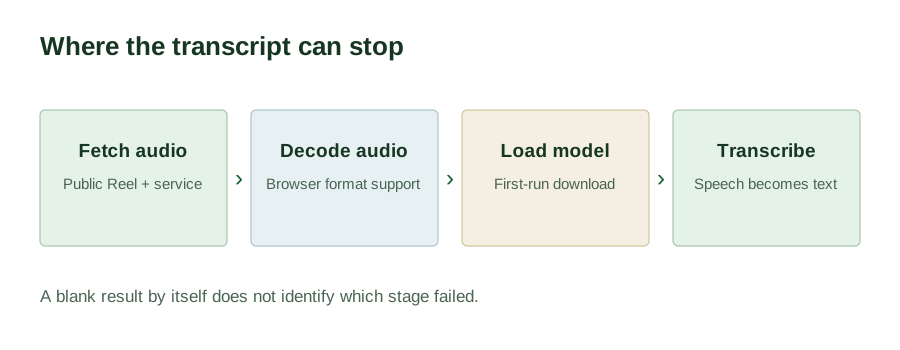
Read the stage before you retry
- Fetching the Reel audio. The service must reach a public Reel and return its audio. Private, removed, restricted, or temporarily unavailable links can stop here. A server-side tool failure can look the same to a visitor.
- Decoding audio. Once audio arrives, your browser must turn it into samples. A format the browser cannot decode can stop here even though the Reel itself was reachable.
- Loading the speech model. The browser initializes the English model here. A first use may need model files from the network, while a later page load may use cached files; the status alone cannot tell which. A blocked download, an interrupted connection, or too little device memory can stop before any words are recognized. See the model-loading check for this distinction.
- Transcribing. The model processes speech locally. A Reel with music or text overlays but no spoken words may finish with an empty result. English speech can also be misheard; review the text before quoting it.
One link, two observed outcomes
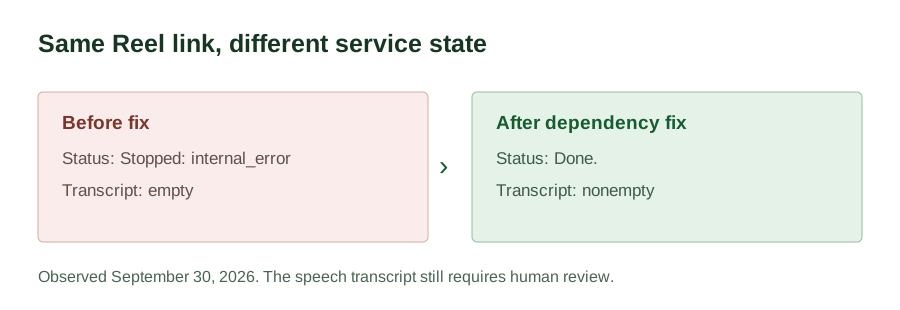
On September 30, 2026, we submitted the same public Reel link twice while testing this site's tool. The first run stopped at the audio-fetch stage. The exact visitor-facing status was Stopped: internal_error; the transcript area remained empty. We did not treat that empty area as a transcription.
The site's audio service runs a download command before the browser speech model starts. Repeating that command with the service's original Python executable returned the exact diagnostic No module named yt_dlp. The original request's process output was not retained, so this was a reproduction of its failing command, not a recovered log line. It showed that the service environment lacked a required download package; it did not show that the Reel was private or silent.
We installed the missing package into the site's own environment and restarted the service. The same Reel link then passed audio retrieval, loaded the browser model, reached Done., and produced a nonempty English transcript. The speech model still made recognition errors, so success means usable draft text, not a certified verbatim record.
What to do with your own failed run
- If fetching fails, reopen the Reel in a signed-out browser window to see whether it is publicly reachable. If it is public and the tool still fails, report the link and the exact status message to the tool operator.
- If decoding fails, try a current browser. Keep the status wording; it distinguishes a browser playback problem from a missing transcript.
- If model loading fails, check whether your browser can obtain and initialize the model and whether the device has enough free memory. Do not infer a download or a timing difference from the status alone.
- If the run says
Done.but the result is empty, listen for actual speech. On-screen captions alone are not speech for this tool.
For supported output and limitations, see the Reel transcript guide. For tools that export timestamped subtitles or support other languages, see the comparison.
Fix the failed stage before retrying the same URL. The Instagram to text workflow shows where one Reel moves from link retrieval to browser recognition. A restricted source will still need a different public link.