Download Instagram Captions
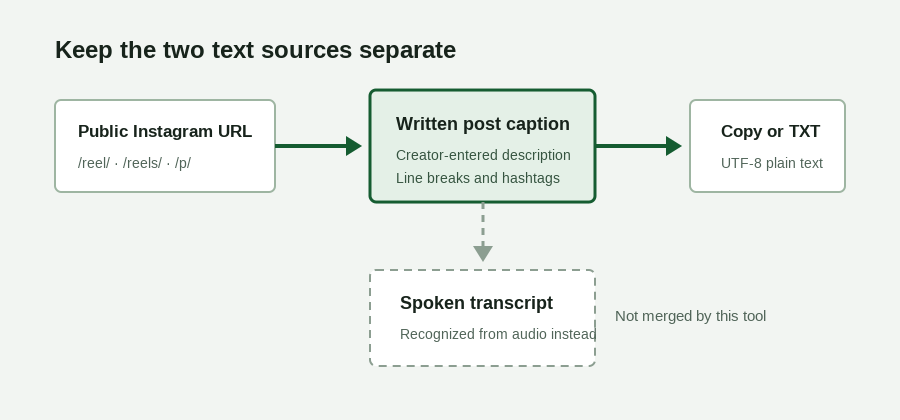
/reel/, /reels/, or /p/ URL. XAPN retrieves the creator-written post caption, not the spoken transcript or words inside the video. No sign-up is required. Copy the result or download it as UTF-8 TXT.Get the written caption
Ready.
No caption yet.
What this download contains
The description the creator entered below the public post, including available line breaks, emoji, mentions, and hashtags.
Recognized speech, native timed captions, comments, account history, image alt text, and words burned into video frames.
One public test, with the content withheld
On November 5, 2026, we ran the metadata-only path against one public Reel already used for XAPN workflow checks. It returned a nonempty written caption with 659 characters, 13 lines, seven nonempty lines, and two hashtags. The caption was not the media title. We report those structural counts rather than republishing the creator's words. This is one retrieval check, not a promise that every public post is reachable.
Why a caption can be unavailable
A complete-looking URL is not proof that its metadata can be retrieved. Private, removed, age-restricted, region-restricted, login-gated, or temporarily blocked posts can fail. A public post can also have no written caption. The tool does not bypass access controls, follow profile pages, expand short links, crawl an account, or merge comments into the result.
Saving and checking the file
Copy uses the visible result. Download creates a UTF-8 plain-text file from the same result, without adding a title, source URL, transcript, or timestamps. Open the saved file and confirm that its first and last lines match the page before deleting your browser result. Preserve the source URL separately if provenance matters.
Use the right text layer
Use this page when you need the creator's written description. Use the Reel transcript workflow when you need spoken words from audio. Use the Instagram text source guide when you are not sure whether the words came from audio, native captions, the post description, or video frames.