Instagram Video to Text
Transcribe a public Reel Open the text worksheet
Build a source-labelled text record
Paste the speech draft and manually enter any relevant screen text. This worksheet runs locally in this page. It does not fetch a video, perform OCR, or verify your entries. Notes are not saved after reload.
No record built yet.
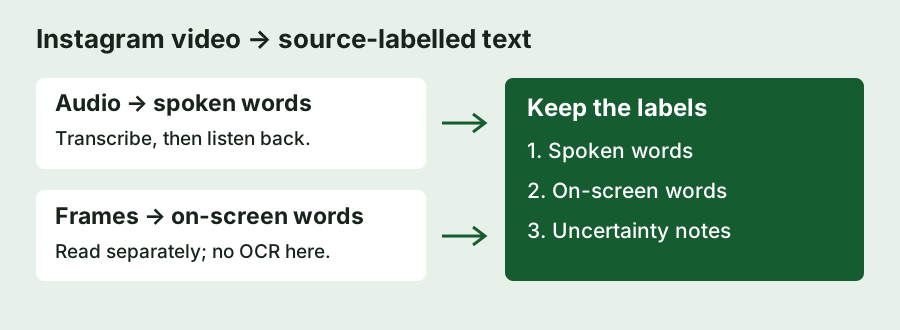
A worked example: the price card is not spoken
Consider this invented example, not a measured Reel: the speaker says “Save the checklist before you start,” while a final card says “Starter pack: $12.” A speech transcript should record the checklist sentence. The card belongs in the on-screen section. Combining both into “Save the checklist before you start, starter pack twelve dollars” would create a sentence nobody actually spoke.
Enter the first sentence in Spoken words and the price in On-screen words. In notes, write “Price appears on the final card; not spoken.” Build the record and inspect the three headings. That gives you a usable handoff for an editor without turning a visual claim into a spoken quote. The worksheet deliberately keeps your wording unchanged; it does not infer missing transitions, summarize, or correct prices.
For a speech-only quotation, use only the checked spoken section. For an accessible description or research note, retain the visual section too, clearly attributed to the screen. If the audio says one price and the card shows another, preserve both and flag the mismatch. Do not choose the more plausible number without further evidence.
If a frame is too blurred to read, leave that detail unresolved. If music masks a word, mark it uncertain in notes rather than filling it from the card. A visible word may help you investigate a name, but it is not proof that the speaker pronounced the same thing. This separation is the worksheet's purpose; it is not an automatic fact-check.
Choose the right conversion path
- Speech in a public Reel: use Instagram to text, listen back, then paste the reviewed draft above. Private or unreachable media cannot be retrieved by this workflow.
- Silent slides or text overlays: pause on the relevant frames and transcribe them manually, or use a separate OCR tool and verify its output. This page has no image-recognition stage.
- The written caption under the post: retrieve that caption separately. It is neither a video frame nor a speech transcript.
For native-caption and no-caption workflows, use the Reels transcript guide. The free transcript generator covers speech conversion; the Instagram transcript guide explains input forms. None of these labels make an audio-only path a universal video-text extractor.
What this workflow does not promise
XAPN uses an English speech model and returns an untimed draft. It does not automatically remove background music, translate other languages, or merge text from video frames. Review names, numbers, and any passage you plan to quote. The worksheet adds source labels to text you supply; successful TXT export proves the record was saved, not that its content is accurate.
Questions
Can I convert an Instagram video with no speech into text?
Not through speech recognition alone. Read or extract the visible text separately and label it as on-screen content.
Does this worksheet send my text to a server?
The worksheet code builds the record in your browser without a text-submission request or browser storage. The page still loads the site's ordinary analytics. Do not treat this as a broader audit of every browser component.
Will the download include timestamps?
No. It contains three labelled plain-text sections, without time alignment or subtitle cues.